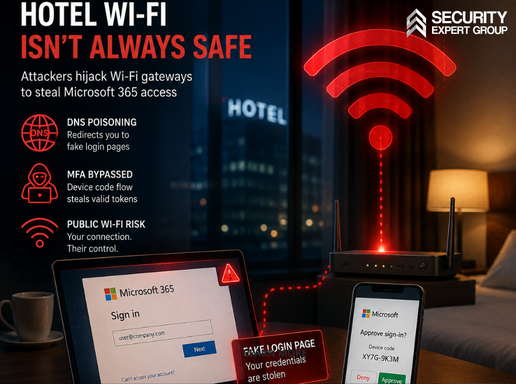
One hacked hotel Wi-Fi gateway silently redirects every guest to fake Microsoft 365 logins
ReliaQuest Threat Research uncovered a campaign, active since at least June 2026, in which attackers compromise the captive-portal Wi-Fi gateways of hotels and conference centers and poison DNS for every connecting guest. Traveling corporate employees are redirected to Microsoft-impersonation pages — and in some cases tricked into approving a device-code sign-in that hands the attacker valid, MFA-satisfied OAuth tokens — without a single phishing email being sent or a single endpoint being infected.
On July 23, 2026, ReliaQuest Threat Research disclosed a widespread credential-harvesting campaign that moves the point of attack off the endpoint and into the venue: threat actors have been compromising public Wi-Fi gateways — the captive-portal appliances that manage guest internet access at hotels, conference centers, and similar shared venues — and using them to hijack the Microsoft 365 accounts of traveling corporate employees. The activity has been ongoing since at least June 2026.
The mechanics exploit a trust assumption baked into every network connection: when a device joins a network, it trusts that network’s DNS resolver. With administrative control of the gateway, the attackers forged DNS responses for every connecting client, funneling traffic for legitimate domains — including Microsoft login portals — to attacker-controlled infrastructure. Hard-coding a public resolver such as Google’s 8.8.8.8 does not help: the request still leaves the device in plaintext, and the gateway simply forges the answer in transit. Compromised gateways were identified across multiple US cities and internationally in India and Saudi Arabia, with victim traffic observed from organizations in financial services, professional services, legal, healthcare, energy, and retail — evidence of a campaign that targets traveling employees wherever they connect, not any single sector.
Two escalations set this campaign apart from ordinary Wi-Fi phishing. In roughly one-third of observed cases, the attackers also attempted to abuse Windows’ Web Proxy Auto-Discovery (WPAD) feature to route all application traffic through a malicious proxy. And in a limited number of cases, they paired the DNS redirect with abuse of Microsoft’s device-code authentication flow: the victim approves what looks like a routine sign-in prompt, and Microsoft issues valid OAuth tokens — MFA already satisfied — to a session the attacker initiated. No password is captured, no traffic is decrypted, and the resulting access survives on tokens rather than credentials.
ReliaQuest noted that the tradecraft closely echoes FrostArmada, an APT28-linked router campaign disrupted in April 2026 — gateway-level DNS poisoning, Microsoft authentication targeting, adversary-in-the-middle account compromise — but explicitly declined to attribute this activity to the Russian military-intelligence group, because no shared infrastructure, code reuse, or operator overlap was found. An operator-facing lure-management panel observed on one of the attacker domains on July 23 indicates the campaign may still be active.
- What Happened
| 1. On July 23, 2026, ReliaQuest Threat Research disclosed a campaign, ongoing since at least June 2026, in which threat actors compromise captive-portal Wi-Fi gateways at hotels and conference centers to hijack Microsoft 365 accounts of traveling corporate employees (ReliaQuest Threat Spotlight, July 23, 2026). |
| 2. Compromised gateways were identified across multiple US cities and internationally in India and Saudi Arabia, with traffic to the malicious infrastructure observed from organizations in financial services, professional services, legal, healthcare, energy, and retail (ReliaQuest, July 23, 2026). |
| 3. The attackers used gateway-level DNS poisoning: because the gateway is the DHCP-assigned DNS resolver for every guest, all DNS queries — including those hard-coded to public resolvers such as 8.8.8.8 — were answered with attacker-controlled IP addresses serving Microsoft-impersonation pages across four attacker-registered domains sharing a single registrant (ReliaQuest, July 23, 2026). |
| 4. In roughly one-third of observed cases, the attackers additionally attempted to abuse Windows’ Web Proxy Auto-Discovery (WPAD) to route application traffic through a malicious proxy; ReliaQuest could not confirm these attempts succeeded (ReliaQuest, July 23, 2026). |
| 5. In a limited number of cases, the attackers abused Microsoft’s device-code authentication flow, obtaining valid, MFA-satisfied OAuth tokens once the victim approved a sign-in prompt — without any credentials being typed on a phishing page (ReliaQuest, July 23, 2026). |
| 6. ReliaQuest assessed the tradecraft as similar to the APT28-linked FrostArmada campaign disrupted in April 2026, but did not attribute the activity to APT28, citing the absence of shared infrastructure, code reuse, or other direct technical linkage (ReliaQuest, July 23, 2026; BleepingComputer, July 2026). |
- Business Impact
| [CONFIRMED] Campaign active since at least June 2026, with compromised Wi-Fi gateways identified across multiple US cities, India, and Saudi Arabia (ReliaQuest, July 23, 2026). |
| [CONFIRMED] Victim traffic observed from six industries — financial services, professional services, legal, healthcare, energy, and retail — confirming traveler-targeted rather than sector-targeted operations (ReliaQuest, July 23, 2026). |
| [CONFIRMED] Device-code flow abuse yields valid OAuth tokens with MFA already satisfied — attacker access that does not depend on stolen passwords and can persist beyond a password reset (ReliaQuest, July 23, 2026). |
| [CONFIRMED] WPAD abuse was attempted in roughly one-third of observed cases, a technique that would extend redirection beyond authentication traffic to most Windows application traffic if successful (ReliaQuest, July 23, 2026). |
| [CONFIRMED] An operator-facing panel for uploading and rotating lure pages, tracking visitors, and IP-allowlisting access was observed on an attacker domain on July 23, 2026, indicating the campaign may remain active (ReliaQuest, July 23, 2026). |
| [ESTIMATED] Any operator of a captive-portal network — airports, co-working spaces, universities, hospitals, event venues — faces a structurally similar attack surface (ReliaQuest assessment, July 23, 2026). The number of compromised gateways, affected organizations, and hijacked accounts has not been publicly disclosed. |
- Likely Root Cause
| Initial access to the gateways likely exploited exposed management interfaces — internet-facing SSH, SNMP, and web administration consoles — combined with weak or reused administrative credentials.
Source: ReliaQuest low-to-medium confidence assessment, July 23, 2026; visibility constraints prevented confirmation. |
| The gateway is the DHCP-assigned DNS resolver for every guest device, so administrative control of a single appliance is sufficient to forge DNS answers for all of them; hard-coded public resolvers and opportunistic-mode encrypted DNS remain forgeable because plaintext requests and fallbacks still transit the gateway.
Source: ReliaQuest, July 23, 2026. |
| Corporate devices were roaming without an always-on, full-tunnel VPN or strict-mode encrypted DNS, leaving DNS resolution and authentication traffic to whatever infrastructure the venue assigned.
Assessed from ReliaQuest reporting and recommendations, July 23, 2026. |
| The device-code authentication flow remained enabled in victims’ Microsoft Entra ID tenants despite having few legitimate uses for most user populations, providing an MFA-satisfied token-issuance path for the attacker.
Assessed from ReliaQuest recommendations, July 23, 2026. |
- Control Failures
| [CF-1] 🔗 THIRD PARTY
Venue-operated Wi-Fi infrastructure sits entirely outside corporate control yet inside employees’ trust boundary — travel and remote-work policy treated hospitality networks as neutral transport, with no compensating controls for a compromised gateway. |
| [CF-2] ⚙️ TECHNOLOGY
No enforced always-on, full-tunnel VPN and no strict-mode encrypted DNS on roaming corporate devices — DNS resolution, including plaintext queries from core Windows services, was left to the untrusted network’s resolver. |
| [CF-3] 🪪 IDENTITY
Microsoft’s device-code authentication flow was left enabled by default in Entra ID, preserving a token-issuance path that satisfies MFA for a session the attacker initiated — no Conditional Access policy restricted it. |
| [CF-4] 📋 PROCESS
WPAD remained enabled by default across the Windows fleet, with no restriction of proxy auto-configuration (PAC) retrieval to approved internal hosts and no auditing of proxy authentications from unknown infrastructure. |
| [CF-5] 👥 PEOPLE
No traveling-employee security baseline — staff were not trained to verify sign-in URLs and certificates on venue networks or to treat unexpected device-code prompts as reportable security events rather than routine friction. |
- Recommendations
5A — Organisational & Technical Controls (for security and IT teams)
| ↳ CF-2 Enforce always-on, full-tunnel VPN plus strict-mode encrypted DNS on every roaming device (NIS2 Article 21(2)(j) — authentication and secured communications; NIST SP 800-207 — Zero Trust Architecture)
Configure the VPN to establish automatically on network connection and block all internet access until the tunnel is active; audit and eliminate split-tunneling exceptions. Pair it with DNS-over-HTTPS or DNS-over-TLS in strict mode — plaintext fallback disabled — because opportunistic mode falls back to exactly the plaintext query the gateway forges. ReliaQuest identifies full-tunnel VPN as the single control that closes the primary exposure. |
| ↳ CF-3 Block the device-code authentication flow in Microsoft Entra ID Conditional Access (NIS2 Article 21(2)(i) — access control policies; ISO 27001:2022 Annex A 5.17 — authentication information)
Create a Conditional Access policy blocking the device-code grant for all users by default. Where genuinely required — shared meeting-room displays, browserless IoT — scope a narrow exception group, restrict it by named location, and recertify membership on a 90-day cycle. The flow has few legitimate uses for most user populations, and blocking it removes the authentication path this campaign’s token theft depends on. |
| ↳ CF-4 Disable WPAD by Group Policy and audit proxy authentications from unknown hosts (CIS Controls v8.1 — Control 4, Safeguards 4.1/4.2 secure configuration; NIST SP 800-53 Rev. 5 — SC-20/SC-21 secure name resolution)
Disable the WinHttpAutoProxySvc service via Group Policy wherever automatic proxy discovery is not required; where it is, restrict PAC-file retrieval to approved internal hosts only. Add detection for wpad.dat retrievals resolving to external IP addresses and review proxy authentication logs for sessions transiting infrastructure your organization does not operate. |
| ↳ CF-1 Treat venue networks as untrusted third-party infrastructure in travel and remote-access policy (NIST SP 800-53 Rev. 5 — AC-17 remote access; NIST SP 800-207 — assume the network is hostile)
Write the assumption into policy: no venue network is trusted transport. Issue corporate hotspots or vetted eSIM data plans to high-risk travelers (executives, finance, legal, M&A), require the full-tunnel VPN before any corporate resource is reachable, and include venue network risk in due diligence for offsites and sponsored conferences. Deliver the user-facing rules below (5B) as a standing travel-security briefing. |
5B — For the Traveling Employee (plain-language rules — share with every traveler)
↳ CF-5 — Plain-language rules for everyone who travels for work. No technical knowledge required — these five habits defeat this attack even on a fully compromised network. (NIS2 Article 21(2)(g) — cyber hygiene and training; ISO 27001:2022 Annex A 6.3 — awareness.)
| 1. Connect your corporate VPN before you open anything.
Make it the first thing you do on any hotel, conference, or airport Wi-Fi — before email, before the browser. If the VPN will not connect, do not work around it: switch to your phone’s mobile hotspot instead. 2. Prefer mobile data over venue Wi-Fi for any sign-in. Your phone’s 4G/5G connection does not pass through the hotel’s equipment. For anything involving a password — email, banking, corporate apps — the hotspot is the safer road. 3. Check the address bar before typing your password. Genuine Microsoft sign-ins happen on login.microsoftonline.com — not on look-alikes built from pieces like “ms365”, “owa”, or “live”. If the address looks even slightly off, stop. 4. Never approve a sign-in prompt or code you did not start yourself. If a page or app asks you to “enter this code” or approve a sign-in you did not initiate seconds earlier, that approval is the attack. Close it and report it — approving it hands a criminal a fully valid session, MFA included. 5. Something feels wrong? Disconnect and report it. Unexpected redirects, certificate warnings, or a login page that looks unusual on venue Wi-Fi: disconnect, switch to mobile data, and tell your security team which venue and network it was. Reporting is never an overreaction — your report may protect every colleague who connects after you. |
- Regulatory Relevance
| NIS2 Article 21(2)(g), (i) & (j); Article 23 reporting
Cyber hygiene and training, access control, and multi-factor / secured communications are explicit risk-management obligations for essential and important entities. A confirmed compromise of an employee’s account at an in-scope entity triggers the 24-hour early warning and 72-hour notification to the national CSIRT — regardless of the fact that the intrusion began on a hotel’s network rather than the entity’s own. |
| NIST SP 800-207 / SP 800-53 Rev. 5 ZTA tenets; SC-20/SC-21, AC-17, IA-2
This campaign is the textbook argument for Zero Trust’s first premise — the network is always assumed hostile. SC-20/SC-21 require secure, validated name resolution; AC-17 governs remote access; IA-2 covers authentication of remote sessions. Location-based trust fails precisely where employees actually work. |
| ISO 27001:2022 Annex A 5.17, 6.3, 8.20, 8.21, 8.23
Authentication-information handling (5.17), awareness (6.3), network security (8.20), security of network services (8.21), and web filtering (8.23) are all engaged. For a certified ISMS, roaming devices resolving DNS through arbitrary venue infrastructure without compensating controls is an auditable nonconformity in the remote-working risk treatment. |
| GDPR Articles 32 & 33
A hijacked Microsoft 365 account typically exposes mailboxes and files containing personal data. Article 32 requires security measures appropriate to the risk — including for mobile working — and a confirmed account compromise involving personal data triggers the 72-hour notification to the supervisory authority under Article 33. |
| DORA Article 9(2)–(3) — protection and prevention
Financial services organizations were among the observed victim traffic. For EU financial entities, DORA’s ICT risk-management framework (in force since 17 January 2025) extends to remote and mobile working: protecting authentication traffic of traveling staff falls squarely within Article 9 protection-and-prevention measures. |
| EU Cyber Resilience Act (CRA) Annex I Part I; Article 14 (from 11 Sep 2026)
Forward-looking: captive-portal gateway appliances are products with digital elements. CRA’s essential requirements mandate secure-by-default configuration and prohibit shipping with known exploitable weaknesses — internet-exposed management consoles behind weak default credentials are exactly the defect class in scope. From 11 September 2026, manufacturers must report actively exploited vulnerabilities via ENISA’s Single Reporting Platform (24h/72h/14d). |
| CIS Controls v8.1 Controls 4, 12 & 14
Secure configuration of enterprise assets (Control 4 — WPAD, DNS, VPN posture), network infrastructure management (Control 12 — relevant to any organization operating guest Wi-Fi), and security awareness training (Control 14) are the safeguards most directly engaged. |
| Venue-side obligations — India & Saudi Arabia India DPDPA 2023 / CERT-In 6-hour reporting; Saudi PDPL
Hotels and venues operating the compromised gateways in India face CERT-In’s 6-hour incident-reporting directive and data-fiduciary duties under the DPDPA 2023; venues in Saudi Arabia face controller obligations under the Saudi Personal Data Protection Law. [KB UPDATE NEEDED] Saudi PDPL — Personal Data Protection Law (Royal Decree M/19, as amended); scope: processing of personal data in Saudi Arabia; relevant to venue operators and breach notification. |
- How SEG Can Help
| ↳ CF-5 💡 Security Awareness Training
SEG delivers a traveling-employee module covering hostile-network assumptions, sign-in URL and certificate verification, and recognition of device-code and OAuth-consent prompts as attack surface — turning the weakest moment of the journey into a reporting trigger instead of a compromise. |
| ↳ CF-2 / CF-3 💡 vCISO & SaaS Configuration Review
SEG reviews the Microsoft Entra ID tenant — Conditional Access coverage of the device-code flow, token lifetimes, session controls — and builds the governance for full-tunnel VPN and strict-mode DNS across the roaming fleet, so protection does not depend on which network an employee happens to join. |
| ↳ CF-1 / CF-4 💡 Penetration Testing & Vulnerability Management
SEG simulates rogue-network and adversary-in-the-middle scenarios against roaming corporate devices to validate that VPN, DNS, and WPAD hardening actually hold — and, for organizations operating guest Wi-Fi themselves, identifies internet-exposed management interfaces before someone else does. |
| ↳ CF-1 💡 Third-Party Risk Assessment
SEG extends third-party risk beyond suppliers to the venues where your people work: network due diligence for offsites, sponsored conferences, and long-stay locations, treating every borrowed network as an attack surface with defined compensating controls. |
| 🎯 Strategic Signal
The perimeter now travels with the employee — and attackers have noticed. The most efficient campaigns of 2026 no longer breach the corporate estate; they compromise the infrastructure employees borrow: hotel gateways, conference Wi-Fi, home routers. One appliance yields every guest, every day, with no phishing email to filter and no malware to detect. Organizations that still define trust by network location will keep losing accounts to networks they have never seen and will never control. The traveling-employee risk program — full-tunnel VPN, identity-layer hardening, and trained skepticism — is no longer hygiene. It is the operative perimeter. |
| 💬 SEG Expert View — Denys Leontiev, Senior Security Expert
This campaign proves once again that attackers are always one step ahead — and that they no longer need to touch your infrastructure to reach your people. The employee here did everything right: real hotel, real network, the correct Microsoft address typed into the browser. The network itself lied to them. Our advice is to stop asking whether a network is safe and assume it never is. Three controls decide the outcome. A full-tunnel VPN that comes up before any traffic leaves the device. A Conditional Access policy that blocks the device-code flow almost nobody in your organization actually uses — five minutes of work that removes the exact token path this campaign exploited. And employees trained to treat every unexpected sign-in prompt on the road as an incident, not an inconvenience. None of this requires heroics. It requires identifying the asset that is genuinely hard to restore — in this case a valid, MFA-satisfied Microsoft 365 session in an attacker’s hands, which survives a password reset — and investing there before travel season, not after the first hijacked mailbox. |
📖 Sources
- ReliaQuest — Threat Spotlight: DNS Poisoning Tactics Expand to Hospitality Wi-Fi — July 23, 2026
- BleepingComputer — Hackers hijack hotel Wi-Fi DNS to steal Microsoft 365 accounts — July 2026
- CSO Online — Hackers are compromising hotel Wi-Fi gateways to hijack Microsoft 365 accounts — July 2026
- TechTimes — Hotel Wi-Fi Gateways Weaponized to Steal Microsoft 365 Logins: MFA Bypassed — July 25, 2026
• CyberInsider — Hackers use DNS poisoning on hotel Wi-Fi to steal Microsoft 365 accounts — July 2026